
Every email signature platform demos beautifully: a drag-and-drop designer, a gallery of templates, a dashboard. The differences that decide whether your rollout succeeds only show up later — in deployment coverage, directory hygiene and the second month's invoice. This guide is the checklist we wish every buyer had: eight evaluation points, the red flags, and the questions that cut through a sales call.
1. Deployment model — the decision that outranks all others
How does the signature physically get into the email? There are only three honest answers:
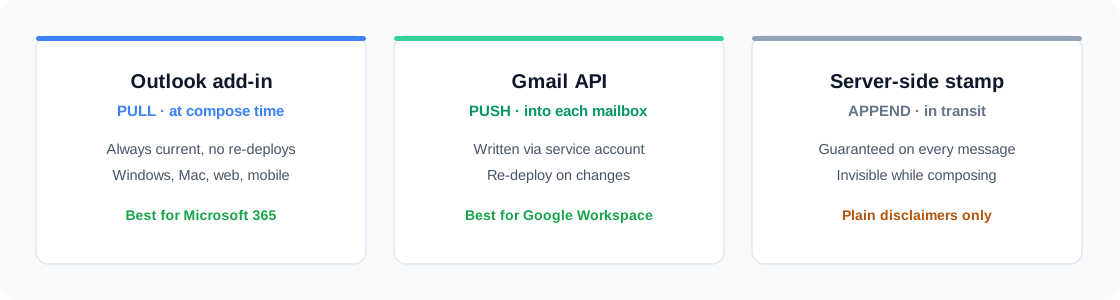
- Outlook add-in (pull): the signature is applied as the user composes — always current, works across Windows, Mac, web and mobile Outlook.
- Gmail API push: the signature is written into each Google Workspace mailbox; updates require a re-deploy.
- Server-side stamping: appended in transit. Guaranteed delivery, but signatures land under the whole thread and can't be seen while writing.
Mixed Microsoft + Google environments need a platform that does both natively. If a vendor only does one, the other half of your company stays inconsistent forever.
2. Directory sync
Signatures are only as accurate as the data inside them. Look for read-only sync from Entra ID and Google Directory: names, titles, phones, photos and group membership flowing into segments automatically. Red flag: any workflow where employee data is maintained in a spreadsheet.
3. Templates and design control
- Email-safe output: table-based HTML, inline styles, solid color fallbacks.
- A real template library to start from, not an empty canvas.
- Brand controls — your colors, logo and fonts applied across every template.
- Per-segment assignment, so sales, support and execs each get the right layout.
4. Reply and internal signatures
The full banner belongs on the first external email — not on the fifth reply in a thread, and not between colleagues. Mature platforms support a compact reply signature and an internal variant chosen automatically by recipient. This single feature separates tools designed for real email behavior from tools designed for screenshots.
5. Campaigns and analytics
The signature slot is a marketing channel; the platform should treat it like one. Check for: a reserved banner zone, scheduled campaigns with start/end dates, rotation between creatives, tracked links, and click reporting by campaign, device and geography. If the answer is "you can paste any HTML", analytics will be your problem.
6. Visibility and control
- Coverage dashboard: who has a live signature, who is stale, who failed — per person.
- Per-employee overrides and a kill switch to disable a signature instantly.
- Roles for the people who run it: marketing edits campaigns without touching deployment settings.
- An audit log of who changed what.
7. Security posture
The platform touches your directory, so the bar is high: least-privilege scopes (directory read, signature write — never mail content), encrypted credentials at rest, and SSO for the admin panel. Ask the vendor to name the exact OAuth scopes; hesitation is an answer.
8. Total cost of ownership
Per-user pricing looks small until you multiply by headcount and add the "marketing module" surcharge. Compare on: price per user per month, whether campaigns/analytics cost extra, onboarding fees, and the admin hours the tool saves or creates. A platform that needs a consultant to roll out has already failed point one.
Red flags worth walking away from
- Signature delivered as one big image.
- "Email signatures for Google" that turn out to be a Chrome extension every user must install.
- No way to see deployment status per employee.
- Employee data managed by CSV upload.
- No reply or internal variants — banner on every message in the thread.
Where GraceMark fits
GraceMark was built against this exact checklist: native Microsoft 365 add-in and Google Workspace push, directory sync into segments, 76 email-safe templates, reply and recipient-aware internal signatures, scheduled campaign banners with click analytics, per-employee deploy status, roles and a full audit log.
Frequently asked questions
Do we need different tools for Microsoft 365 and Google Workspace?
No — and you shouldn't accept that. One platform with both deployment models keeps every team on identical branding.
What does rollout actually look like?
Connect the directory (15 minutes), pick and brand a template, map it to segments, deploy. Most companies are fully covered within an hour.
Is server-side stamping ever the right choice?
For plain legal disclaimers, yes. For branded signatures people see while composing — no, the add-in/push models are strictly better.
How should we run the evaluation?
Trial with one real team, including one Google and one Microsoft user if you're mixed. Deploy, change a title in the directory, swap a banner, read the analytics. The whole checklist verifies itself in a day.